We have monitored thousands of channels and analyzed mountains of watch time data. In this guide, we will break down the exact strategies we use to increase watch time on YouTube, boost average view duration (AVD), and maximize your YouTube session duration in 2026.
Understanding the Core Metrics
Before we execute any YouTube retention strategy, we must define the numbers that dictate your channel’s success. NOTE: If you already know all this, just skip to the next section.
Watch Time
This is the total number of minutes viewers have spent watching your videos. It is the raw volume of attention you have captured. YouTube uses this as a primary ranking signal. More total watch time equals more reach, better recommendations, and higher revenue.
If you are aiming for monetization, reaching the 4,000 valid public watch hours threshold is mandatory.
Average View Duration (AVD)
This metric calculates how long viewers watch your videos on average. It is determined by dividing the total watch time by the total number of video plays. If your video has 1,000 minutes of total watch time across 500 plays, your AVD is 2 minutes.
High AVD proves to the algorithm that your content is highly engaging.
Audience Retention
Audience retention on YouTube shows the exact percentage of your video that viewers watch. A good average view duration depends strictly on video length.
For videos under 5 minutes, you need a 50% to 70% retention rate. For longer videos, 40% to 60% is a massive success.
YouTube Session Duration
This is the holy grail. Session duration tracks how long a viewer stays on the platform after clicking your video. If a user watches your video and then continues watching three more videos on your channel, YouTube rewards the initial video that started the session.
Now, let's look at the practical, tested tactics to optimize these numbers.

Optimize Long-Form Content for Smart TVs
People are moving away from watching YouTube exclusively on their phones. They are watching on the big screen in their living rooms. YouTube has officially crossed 1 billion hours watched on TVs daily. This shift directly impacts watch time optimization.
When viewers watch on a TV, they do not scroll. They lean back and watch. This environment is perfect for long-form content like documentaries, deep dives, and educational videos. Videos designed for the big screen hold attention longer and naturally drive up watch time.
Why Long-Form Works Here:
- Deep Engagement: Viewers are physically settled in, meaning they are less likely to click away compared to mobile users.
- Binge-Watching Trigger: Long-form videos heavily boost YouTube session duration because they keep the user locked into a single viewing environment.
- Higher Revenue: Longer videos allow for more mid-roll ad placements.
Case Study: The 4K Quality Switch
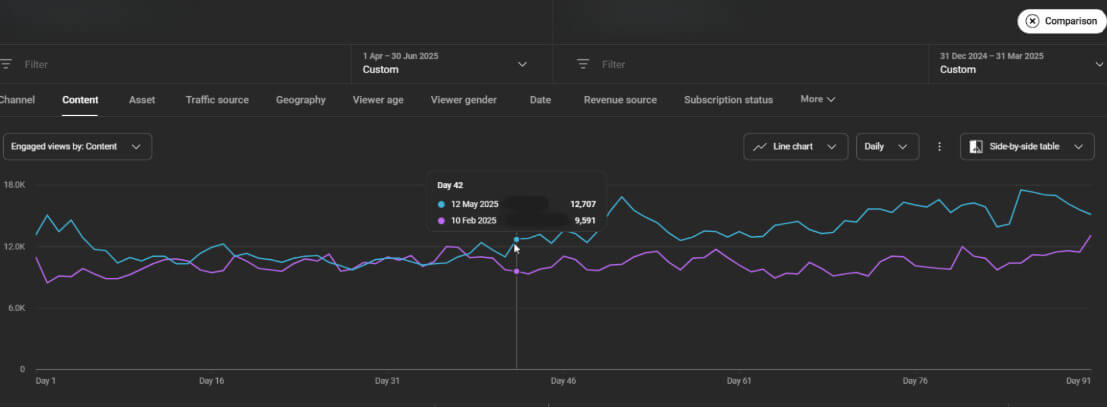
A music channel that struggled to increase watch time on YouTube despite having great audio. Just implemented a simple change: switched their video output to 4K resolution and tailored the visual pacing for smart TVs. The result was immediate. Because TV viewers loved the crisp visual experience, the channel saw a massive boost in watch time, leading directly to a 52% increase in overall revenue.
The TV Optimization Checklist:
- Render in 4K: At minimum, shoot and render in 1080p, but 4K is the standard for TV optimization.
- Upgrade Your Audio: TV viewers use soundbars and external speakers. Poor audio quality will cause immediate drop-offs. Compress your audio levels to avoid massive volume spikes.
- Target 15 to 60 Minutes: Build videos that are long enough to justify sitting on the couch, but not so long that they drag.
- Scale Visual Assets: Ensure text, graphics, and lower thirds are readable from 10 feet away.
Launch 24/7 Live Streams
If you have a massive library of pre-recorded content, letting it gather dust is a waste of potential watch time. Launching a 24/7 continuous stream of your existing videos is one of the most effective average watch time tips we can offer.
With 24/7 streams, your content is always live. Viewers from any time zone can drop in, chat with others, and watch for hours. It turns a static video library into an interactive, evergreen broadcasting network.
Case Study: DONA English
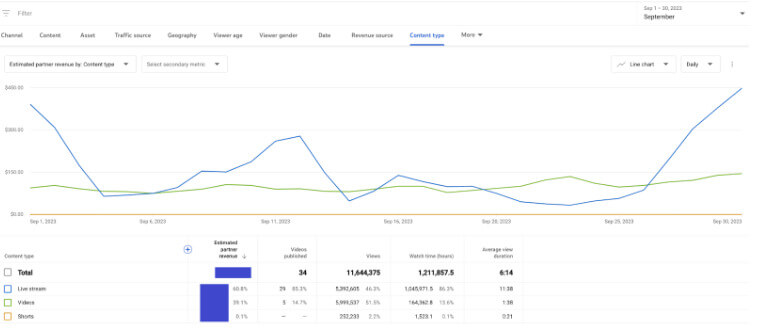
DONA English is a channel with 5.2 million subscribers and over 2 billion views. They had a huge catalog of pre-recorded kids' and teens' content. They implemented a 24/7 live streaming strategy, running four simultaneous streams with smart restarts. The numbers were staggering. Within 10 days, streaming accounted for 20% of their total revenue. By month two, it hit 60%, with channel views jumping by 42%. By month three, the 24/7 streams were driving 72% of their total channel revenue.
How to Execute 24/7 Streams Effectively:
- Group Evergreen Content: Only use videos that remain relevant regardless of when they are watched.
- Run Multiple Streams: Running 3 to 5 simultaneous streams generates more reach and feeds more data to the algorithm.
- Restart the Loop: Set automatic stream restarts every 3 days. This refreshes the stream's performance and clears out dead cache to keep uptime stable.
- Refresh Metadata: Update titles and thumbnails when you restart the stream to test different click-through rates.
- Deploy Chatbots: Use automated chatbots to prompt viewers to like the stream and interact, which signals high engagement to YouTube.
Want Streams Handled for You?
Setting up servers, managing loops, and avoiding stream crashes requires technical infrastructure. We manage this exact setup for creators every single day. We handle the entire 24/7 streaming pipeline, from content preparation to analytics tracking. If you want to deploy this strategy without the technical headache, reach out to our team.
Exploit Scheduled Premieres
Premieres allow you to schedule a video launch where your audience watches it together in real time. It combines the anticipation of a live stream with the polished quality of a pre-recorded upload.
Premieres force viewers to show up at a specific time. Because they are watching live with you and the community in the chat, they are significantly less likely to click away. We consistently see a 10% to 15% increase in total watch time on videos launched as Premieres versus standard uploads.
Case Study: Turning a Leak into a Massive Win
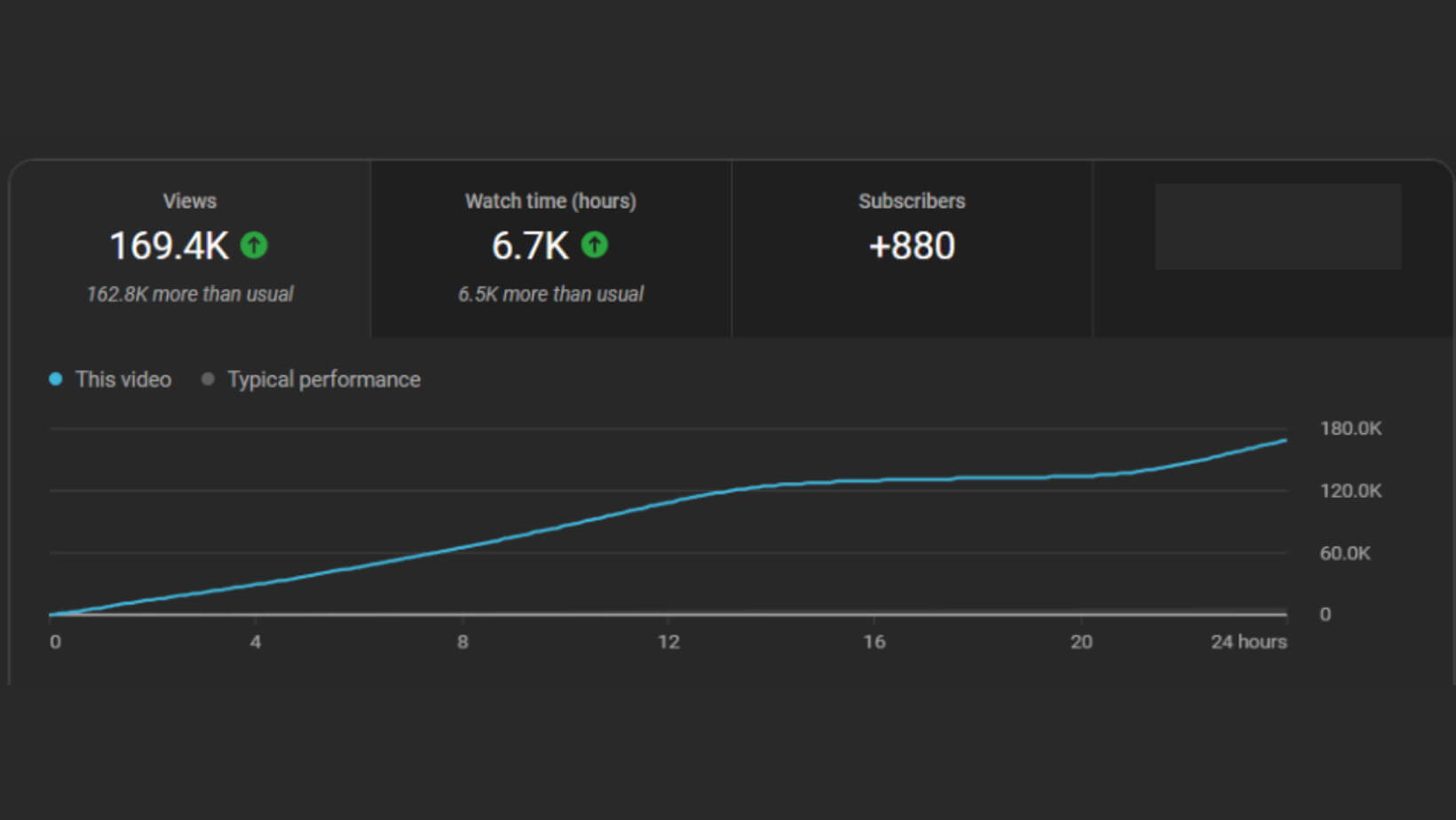
Alena, a pop artist partner, was hyping a new track. Weeks before release, an AI-generated version leaked online. Instead of panicking, they weaponized the hype. They set up a delayed Premiere on YouTube and used the leak to drive traffic directly to the upcoming official Premiere. When the video dropped, it hit 169,000 views in 24 hours and generated 183% more revenue than her previous quarter. The live chat engagement locked viewers in, skyrocketing the retention graph.
The Premiere Checklist:
- Monetize the Waiting Room: Run ads and allow Super Chats before the video even starts.
- Use Custom Countdowns: Do not use the default countdown. Select a theme that matches your video's mood.
- Pin a CTA in Chat: Before the Premiere starts, pin a comment in the live chat directing viewers to a specific playlist to watch immediately after the video ends.
- Be Present: You must be in the chat, interacting with viewers as the video plays. Your presence keeps them from leaving.
Build High-Retention Playlists
Most creators treat playlists as a filing cabinet. We treat playlists as a trap to capture YouTube session duration.
When a viewer watches a video inside a playlist, the next video auto-plays seamlessly. You remove the friction of choice. The viewer does not have to click back to the homepage or search for a new video; the content just keeps coming.
Case Study: M.Worship Music
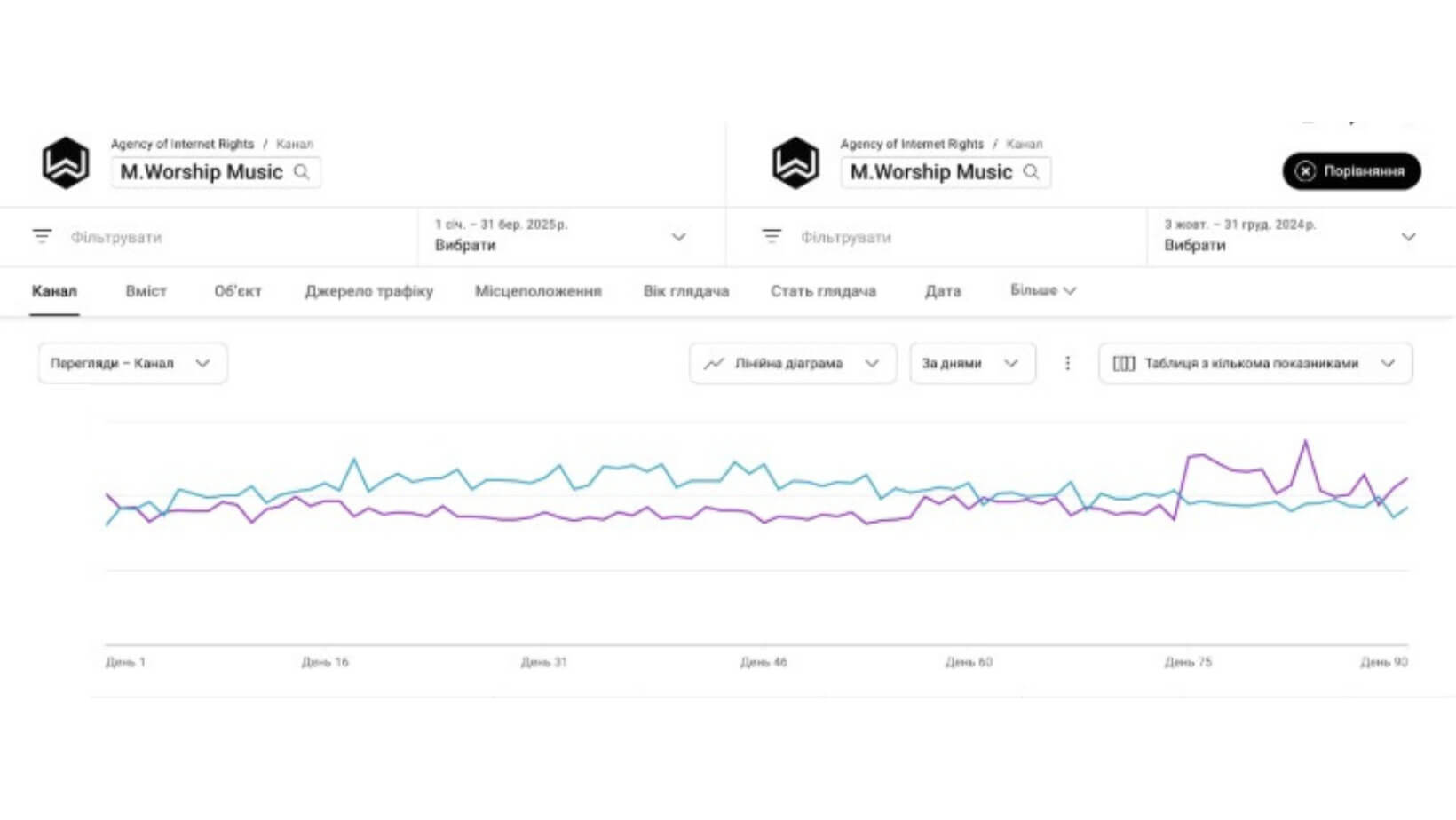
M.Worship Music had videos performing well locally but failing in high-CPM markets like the U.S. They restructured their playlists and grouped tracks by exact listener intent, such as "Peaceful Worship" or "Morning Praise." Then they optimized the playlist metadata with SEO-friendly titles and descriptions. As a result, views grew by 11%, RPM rose by 5%, and overall revenue surged 17% without them uploading a single new video.
The Playlist Optimization Checklist:
- Front-Load the Best: Place your highest-converting, highest-retention videos at the number one and two spots in the playlist. Hook them immediately.
- Design Custom Covers: Do not rely on the auto-generated thumbnail. Upload a custom, visually distinct thumbnail specifically for the playlist.
- Optimize Playlist SEO: Treat the playlist description like a blog post. Pack it with relevant keywords so the playlist itself ranks in YouTube search.
- Use End Screens Properly: Never link to a single video on your end screen. Always link directly to a heavily curated playlist.
Master the First 15 Seconds and Map Drop-Offs
You cannot improve average watch time if you lose 50% of your audience in the first 15 seconds.
The beginning of your video dictates everything. Viewers click your thumbnail expecting a specific outcome. Within 15 seconds, you must confirm that they made the right choice. If you use a long, animated intro logo or start with "Hey guys, welcome back to the channel," you are actively killing your retention.
How to Fix Weak Intros:
- Cut the Fluff: Start speaking immediately. Deliver the core premise of the video in the first sentence.
- Match the Thumbnail: If your thumbnail shows a specific object or situation, that object or situation must be visible in the first 3 seconds.
- Open the Loop: Tell them exactly what they will get by the end of the video, but withhold the specific answer.
Want stronger watch time?
Contact us. We’ll help you keep viewers watching longer.
Analyzing Watch Time Analytics
If your channel gets clicks but loses viewers too early, there is usually a pattern behind it. That's why you need to know exactly how to analyze your data in order to identify the exact place where everything is happening.
- Go into your YouTube Studio. Click Analytics, then Content, and open an individual video. Scroll down to the Audience Retention graph. This graph is the most important tool you have.
- Look for sharp dips. If you see a massive drop-off at the 2-minute mark, watch that exact timestamp. What happened? Did the pacing slow down? Did you go off-topic? Identify the flaw and ensure you never repeat it in future videos.
- Look for spikes. A spike means viewers rewound the video to watch a specific moment again. Figure out what that moment was: a great joke, a complex graphic, a fast transition, and replicate it in your next upload.
- Pacing and Easter Eggs: To keep retention high through the middle of the video, you need pattern interrupts. Change camera angles, punch in the zoom, or use text overlays. Do not let the screen remain static for more than 10 seconds.
- Use incentives to push viewers to the end. Promise to reveal a specific secret, an outtake, or a giveaway requirement in the final minute. If you hide "Easter eggs" or subtle visual jokes throughout the video, curious viewers will watch the video without skipping, and some will even re-watch it, doubling your watch time.
Make Every Next Minute Count
Increasing your average watch time on YouTube in 2026 involves reading the data, understanding viewer psychology, and building systems that keep people glued to the screen.
Do not guess what the algorithm wants. Give it exactly what it asks for: long, uninterrupted viewing sessions.
If you are a creator struggling to hit these metrics, stop trying to do it all alone. We have the data, the software, and the hands-on experience to fix your retention curves and scale your channel.
Ready to dominate the algorithm and drastically increase your watch time? Get in touch with our team of experts today. Start scaling your channel right now.